# Environment-dependent TB
- [Method Introduction:](#method-introduction)
- [Example: Bulk Silicon](#example-bulk-silicon)
- [1. Data Preparation](#1-data-preparation)
- [ 2. Training Neural Network Emperical TB Model (nnsk model) ](#2-training-neural-network-emperical-tb-model-no-env)
- [ 2.1 Training a First Nearest Neighbour Model ](#21-training-a-first-nearest-neighbour-model)
- [ 2.2 Add More Orbitals and Neighbours ](#22-add-more-orbitals-and-neighbours)
- [ 2.3 Training the Bond-length Dependent Parameters ](#23-training-the-bond-length-dependent-parameters)
- [ 3. Training Deep Learning TB Models with Env. Correction ](#3-training-deep-learning-tb-models-with-env-correction)
## Method Introduction:
The basic idea of the DeePTB method is to fit the DFT electronic band structure through deep learning, thereby constructing a TB model to achieve first-principles accuracy.
In the TB model, the Hamiltonian matrix elements can be expressed as:
$$
\begin{equation}
H_{i,j}^{lm,l^\prime m^\prime} = \left\langle {i,lm} \right| \hat{H} \left| {j, l^\prime m^\prime} \right\rangle
\end{equation}
$$
where $i$, $j$ are site indices. $l$ and $m$ are angular and magnetic quantum numbers. $H$ is the Hamiltonian operator. In DeePTB, we choose the traditional Slater-Koster (SK) parameterized Hamiltonian, where all the Hamiltonian can be expressed in terms of SK integrals: $h_{ss\sigma}, h_{sp\sigma}, h_{pp\sigma}, h_{pp\pi}, \cdots$, etc.
Based on these SK integrals, we can construct Hamiltonian matrix as follows:
$$
\begin{equation}
H_{i,j}^{lm,l^\prime m^\prime} = \sum_{\zeta} \Big[ \mathcal{U}_{\zeta}(\hat{r}_{ij}) \ h_{ll^\prime \zeta} \Big]_{mm^\prime}
\end{equation}
$$
Here, $\mathcal{U}_{\zeta}$ is a $[2l+1,2l^\prime+1]$ matrix, and $\zeta$ represents the key type, such as $\sigma, \pi$, etc. The specific form of $\mathcal{U}_{\zeta}$ can be found in [Ref:1](https://journals.aps.org/pr/abstract/10.1103/PhysRev.94.1498).In traditional SK-TB, SK integrals often use analytical expressions based on the following empirical rules, and are based on the two-center approximation.
In DeePTB, we use a neural network-based method to predict SK integrals, which is expressed as:
$$
\begin{equation}
h^{\text{env}}_{ll^\prime{\zeta}} = h_{ll^\prime{\zeta}}(r_{ij}) \times \left[1+\Phi_{ll^\prime\zeta}^{o_i,o_j}\left(r_{ij},\mathcal{D}^{ij}\right)\right]
\end{equation}
$$
where $h_{ll^\prime{\zeta}}$ is also an SK integral based on an analytical expression. In DeePTB, the undetermined coefficients of the analytical expression are represented by neurons. $h^{\text{env}}_{ll^\prime{\zeta}}$ depends on the local environment introduced by the neural network. Refer to [DeePTB paper](https://journals.aps.org/prmaterials/abstract/10.1103/PhysRevMaterials.2.083801) for more information.
In the following, we will use Silicon as an example to show the full training procedure of DeePTB.
## Example: Bulk Silicon
Bulk silicon has diamond structure at room temperature and pressure. Due to its widespread applications in the semiconductor industry, it has been a significant important element in modern society. Here we provide an example of building a silicon **DeePTB** model. By following this instruction step-by-step, you will be introduced to the high-level functionalities of **DeePTB**, which can provide a model bypass empirical TB, to achieve *ab initio* accuracy.
This example can be seen in the `example/silicon` folder. The whole training procedure can be summarized as below:
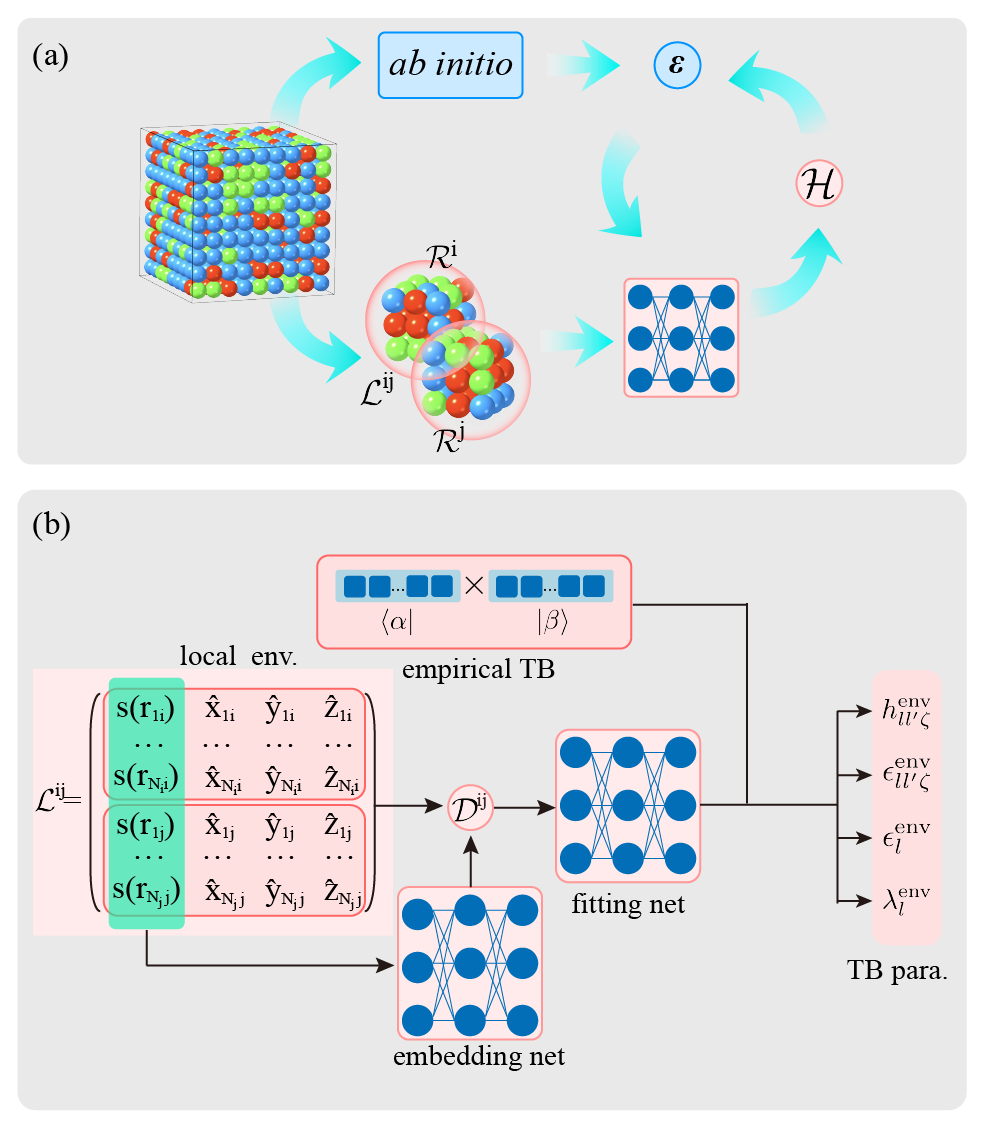 This procedure contains the full steps to training an environmentally corrected **DeePTB** model. The converged model can predict the electronic structure of both perfect crystals and the configurations with atomic distortion, while can generalize to structures with more atoms.
### 1. Data Preparation
The data for training and plotting contains in `data` folders:
```bash
deeptb/examples/silicon/data/
|-- kpath.0 # train data of primary cell. (k-path bands)
|-- kpathmd25.0 # train data of 10 MD snapshots at T=25K (k-path bands)
|-- kpathmd100.0 # train data of 10 MD snapshots at T=100K (k-path bands)
|-- kpathmd300.0 # train data of 10 MD snapshots at T=300K (k-path bands)
|-- kpt.0 # kmesh samples of primary cell (k-mesh bands)
|-- kpath_spk.0
|-- silicon.vasp # structure of primary cell
```
Each of these folders, contains data files with required format, here we give an examples of `kpath.0`:
```bash
deeptb/examples/silicon/data/kpath.0/
-- info.json
-- eigs.npy
-- kpoints.npy
-- xdat.traj
```
The meaning and useage of the files can refer to `../quick_start/input.md`.
### 2. Training Neural Network Emperical TB Model (no env)
#### 2.1 Training a First Nearest Neighbour Model
We first analyse the bond length by running.
```bash
dptb bond ./data/silicon.vasp
```
The output will be like:
```bash
Bond Type 1 2 3 4 5
------------------------------------------------------------------------
Si-Si 2.35 3.84 4.50 5.43 5.92
```
The fitting of empirical TB on the first nearest neighbours shares the same procedure as the `hBN` example. We suggest the user try on hBN before proceeding. This time, the training starts from the first nearest neighbour checkpoint in `input` folder. Run the following command to train the first `nnsk` model:
```bash
dptb train ./input/2-1_input.json -o ./nnsk
```
#### 2.2 Add More Orbitals and Neighbours
We can plot the converged `nnsk` model in last step just as in `hBN` example using `band_plot.py` script.
This procedure contains the full steps to training an environmentally corrected **DeePTB** model. The converged model can predict the electronic structure of both perfect crystals and the configurations with atomic distortion, while can generalize to structures with more atoms.
### 1. Data Preparation
The data for training and plotting contains in `data` folders:
```bash
deeptb/examples/silicon/data/
|-- kpath.0 # train data of primary cell. (k-path bands)
|-- kpathmd25.0 # train data of 10 MD snapshots at T=25K (k-path bands)
|-- kpathmd100.0 # train data of 10 MD snapshots at T=100K (k-path bands)
|-- kpathmd300.0 # train data of 10 MD snapshots at T=300K (k-path bands)
|-- kpt.0 # kmesh samples of primary cell (k-mesh bands)
|-- kpath_spk.0
|-- silicon.vasp # structure of primary cell
```
Each of these folders, contains data files with required format, here we give an examples of `kpath.0`:
```bash
deeptb/examples/silicon/data/kpath.0/
-- info.json
-- eigs.npy
-- kpoints.npy
-- xdat.traj
```
The meaning and useage of the files can refer to `../quick_start/input.md`.
### 2. Training Neural Network Emperical TB Model (no env)
#### 2.1 Training a First Nearest Neighbour Model
We first analyse the bond length by running.
```bash
dptb bond ./data/silicon.vasp
```
The output will be like:
```bash
Bond Type 1 2 3 4 5
------------------------------------------------------------------------
Si-Si 2.35 3.84 4.50 5.43 5.92
```
The fitting of empirical TB on the first nearest neighbours shares the same procedure as the `hBN` example. We suggest the user try on hBN before proceeding. This time, the training starts from the first nearest neighbour checkpoint in `input` folder. Run the following command to train the first `nnsk` model:
```bash
dptb train ./input/2-1_input.json -o ./nnsk
```
#### 2.2 Add More Orbitals and Neighbours
We can plot the converged `nnsk` model in last step just as in `hBN` example using `band_plot.py` script.
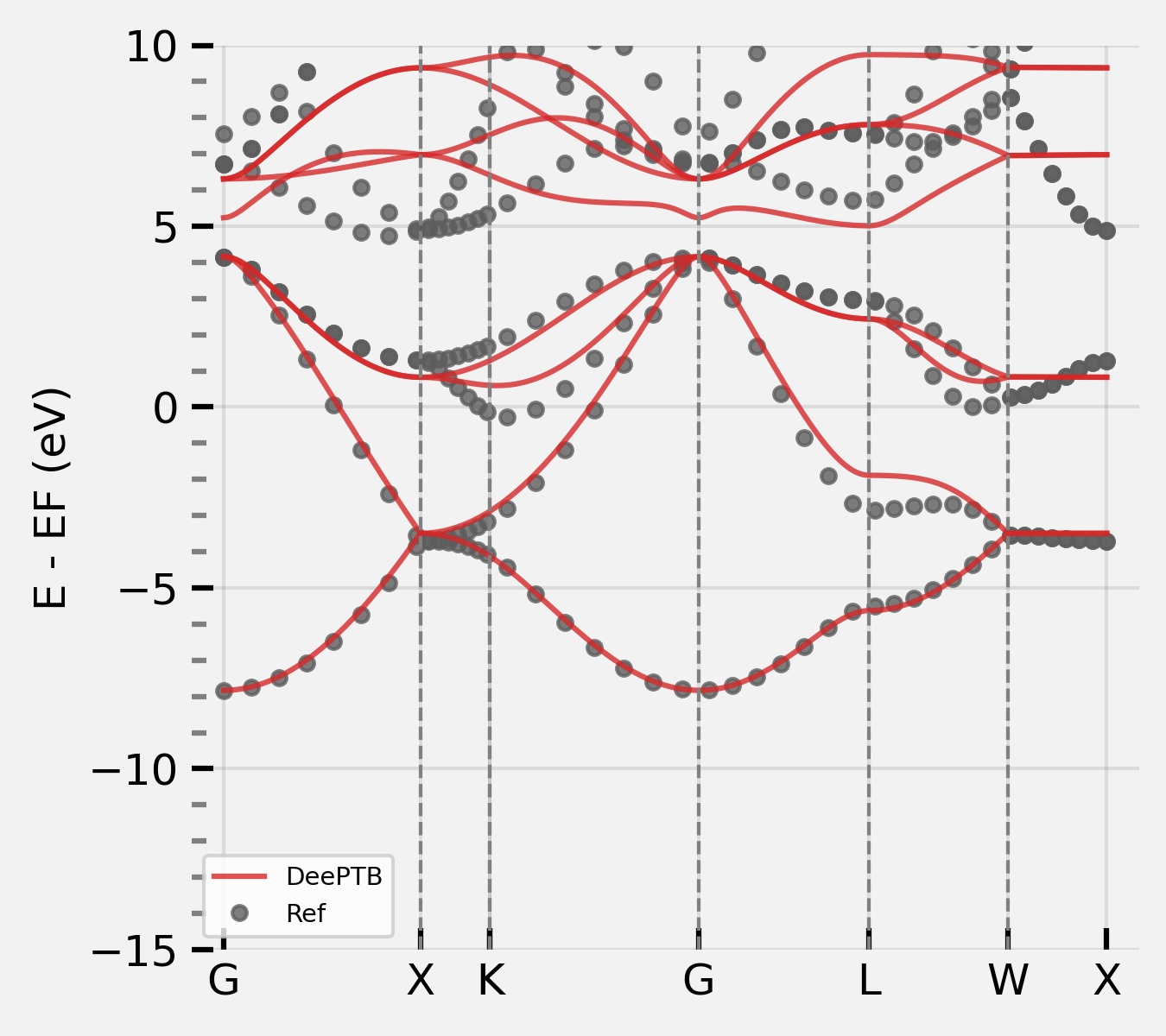 After plotting, we can find that the first fitted model has already captured the shape of the valance bands. However, the conductance band is less accurate since the orbitals `3s` and `3p` is not complete for the space spanned by the considered valance and conductance band. Therefore we need to include more orbitals in the model.
In **DeePTB**, users are able to add or remove orbitals by altering the input configuration file. Here we add `d*` orbital, which can permit us to fit the conductance band essential when calculating excitation properties such as photo-electronics and electronic transport.
First, we add `d*` in `proj_atom_anglr_m` of input configuration, which looks like this:
```json
"basis": {
"Si": ["3s", "3p", "d*"]
}
```
Also, we can correct the onsite energies of the TB orbitals using `strain` method. The `nnsk` model now looks like:
```json
"model_options": {
"nnsk": {
"onsite": {"method": "strain", "rs":2.5 ,"w":0.3},
"hopping": {"method": "powerlaw", "rs":2.6, "w": 0.3},
"freeze": false
}
}
```
Then, we can start training the model with `-i/--init-model` of our last checkpoint, by running:
```bash
dptb train ./input/2-2-1_input.json -i ./nnsk/checkpoint/nnsk.ep495.pth -o ./nnsk_2
```
In this way, the parameters in `nnsk` model corresponding to `3s` and `3p` orbitals can be reloaded.
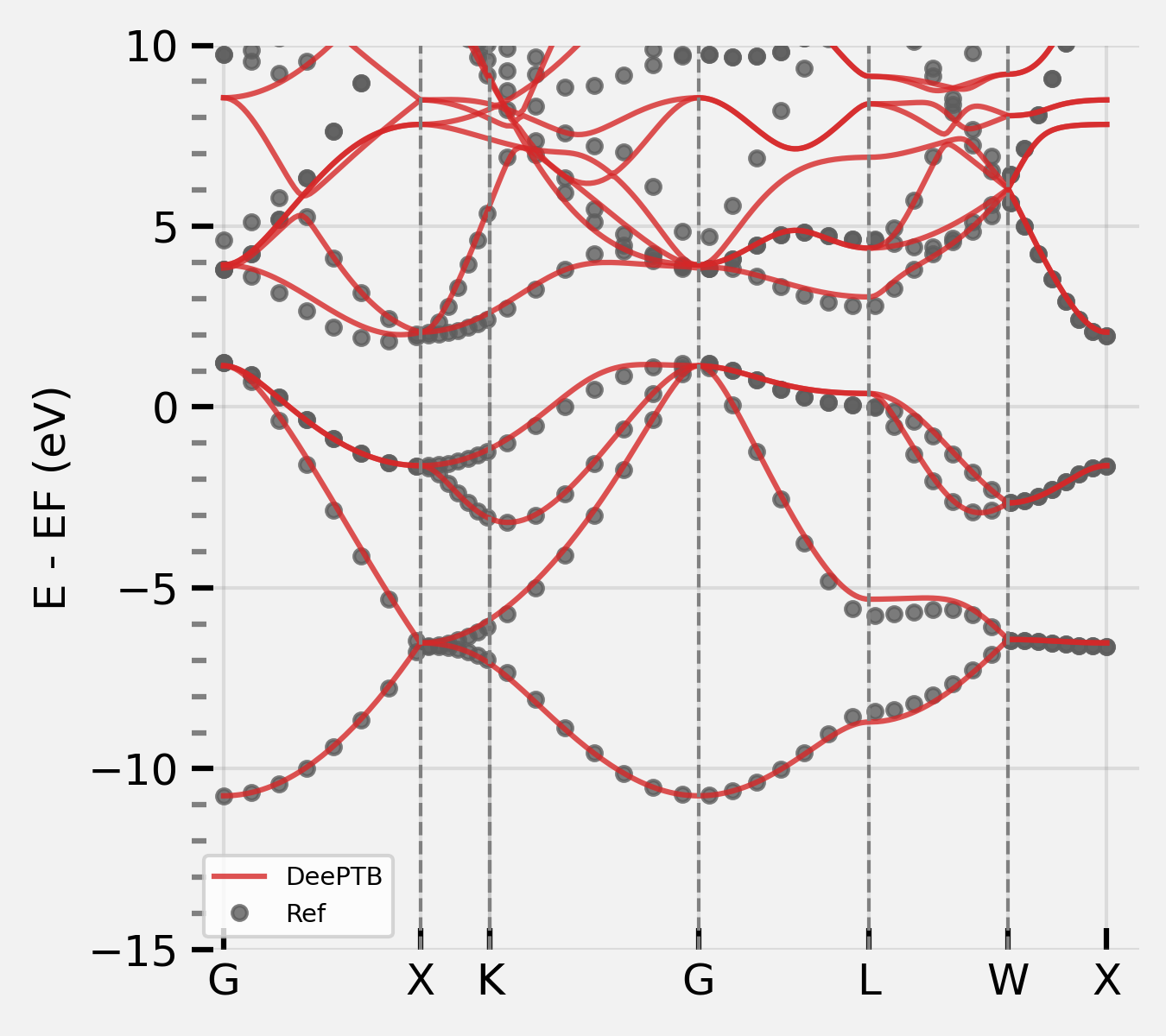
When convergence is achieved, we can plot the band structure again, which shows that both the valance and conductance bands are fitted well:
After plotting, we can find that the first fitted model has already captured the shape of the valance bands. However, the conductance band is less accurate since the orbitals `3s` and `3p` is not complete for the space spanned by the considered valance and conductance band. Therefore we need to include more orbitals in the model.
In **DeePTB**, users are able to add or remove orbitals by altering the input configuration file. Here we add `d*` orbital, which can permit us to fit the conductance band essential when calculating excitation properties such as photo-electronics and electronic transport.
First, we add `d*` in `proj_atom_anglr_m` of input configuration, which looks like this:
```json
"basis": {
"Si": ["3s", "3p", "d*"]
}
```
Also, we can correct the onsite energies of the TB orbitals using `strain` method. The `nnsk` model now looks like:
```json
"model_options": {
"nnsk": {
"onsite": {"method": "strain", "rs":2.5 ,"w":0.3},
"hopping": {"method": "powerlaw", "rs":2.6, "w": 0.3},
"freeze": false
}
}
```
Then, we can start training the model with `-i/--init-model` of our last checkpoint, by running:
```bash
dptb train ./input/2-2-1_input.json -i ./nnsk/checkpoint/nnsk.ep495.pth -o ./nnsk_2
```
In this way, the parameters in `nnsk` model corresponding to `3s` and `3p` orbitals can be reloaded.
When convergence is achieved, we can plot the band structure again, which shows that both the valance and conductance bands are fitted well:
 *Note: In practice, we find that training with the minimal basis set in begin, and then increasing the orbitals gradually is a better choice than directly training with full orbitals from scratch. This procedure can help to reduce the basis size and to improve the training stability.*
To further enhance the model, we can enlarge the cutoff range considered, to build a model beyond the first nearest neighbours. The parameter `r_max` that controls the cutoff radius is set in `info.json` in the dataset folder.
We now increase the `r_max` to be larger than the bong-length of the third nearest neighbour, while shorter than the fourth. However, abrupt change in the cutoff will introduce discontinuity in the model training,therefore, a smoothing function is introduced:
$$f_s(r)=\frac{1}{1+e^{(r-r_{skc})/\omega}}$$
and that is controlled by parameters in `nnsk` keyword in the `model_options` section of the input file:
- `rs` (angstrom unit): $r_{skc}$ it controls the cutoff of the decay weight of each bond.
- `w`: $\omega$, it decides the smoothness of the decay.

As is shown in the above figure, this smoothing function will decay centred at $r_{skc}$. According to the smoothness $\omega$, this function has different smoothness. Here, to take more neighbours' terms into consideration while retaining the stability of fitting, we first set the $r_{skc}$ at the first-nearest neighbour distance, this decay function can suppress the newly included second and third neighbour terms, which brings no abrupt changes to the predicted hamiltonians.
Then what is left is pushing $r_{skc}$ gradually to the value of `bond_cutoff`. This can be achieved by modifying the parameters in the input configuration and repeating along with training with initialization manually. Alternatively, **DeePTB** support to push the smooth boundary automatically. We can set the `push` keyword in `nnsk` model. `push` function takes two kinds of input: either push `rs` by using `rs_ths` or push `w` by using `w_ths`. The rate of the push function is controlled by keyword `period`. An example of the input `model_options` for adding neighbors is as follow:
```json
"model_options": {
"nnsk": {
"onsite": {"method": "strain", "rs":2.5 ,"w":0.3},
"hopping": {"method": "powerlaw", "rs":2.6, "w": 0.3},
"freeze": false,
"push": {"rs_thr": 0.024, "period": 15}
}
}
```
**DeePTB** will push the `rs` by each step in `rs_ths` in each `period` during training. It is recommended to analyse the bond distribution before pushing. The boundary-pushing often takes more training epochs.
We can push the `rs` first by running:
```bash
dptb train ./input/2-2-2_1_input.json -i ./nnsk_2/checkpoint/nnsk.ep501.pth -o ./nnsk_3
```
After we get the converged model, we can further push the `w` by running:
```bash
dptb train ./input/2-2-2_2_input.json -i ./nnsk_3/checkpoint/nnsk.ep1104.pth -o ./nnsk_4
```
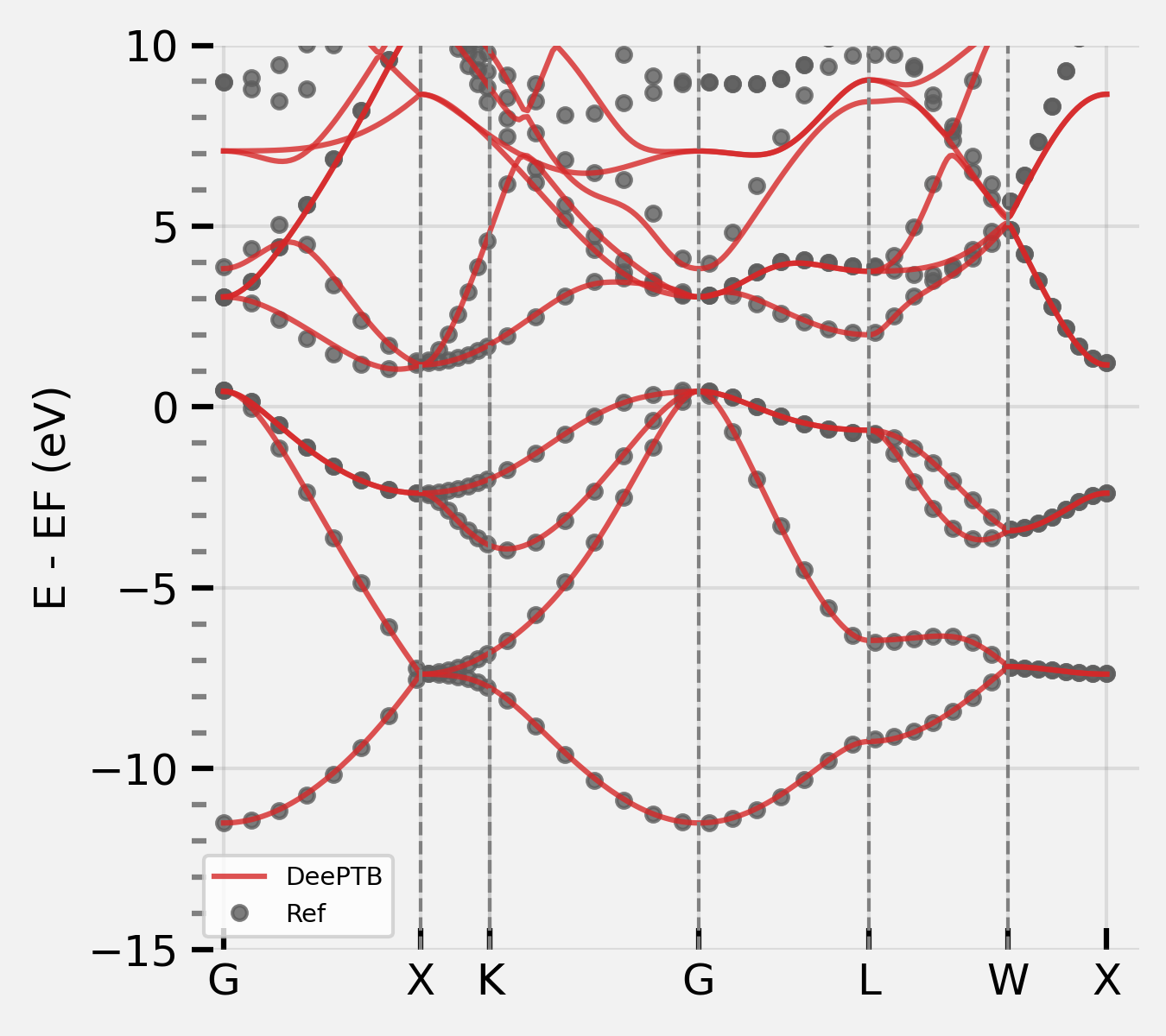
After adding neighbors, the `nnsk` model can now fit the bands even better.
*Note: In practice, we find that training with the minimal basis set in begin, and then increasing the orbitals gradually is a better choice than directly training with full orbitals from scratch. This procedure can help to reduce the basis size and to improve the training stability.*
To further enhance the model, we can enlarge the cutoff range considered, to build a model beyond the first nearest neighbours. The parameter `r_max` that controls the cutoff radius is set in `info.json` in the dataset folder.
We now increase the `r_max` to be larger than the bong-length of the third nearest neighbour, while shorter than the fourth. However, abrupt change in the cutoff will introduce discontinuity in the model training,therefore, a smoothing function is introduced:
$$f_s(r)=\frac{1}{1+e^{(r-r_{skc})/\omega}}$$
and that is controlled by parameters in `nnsk` keyword in the `model_options` section of the input file:
- `rs` (angstrom unit): $r_{skc}$ it controls the cutoff of the decay weight of each bond.
- `w`: $\omega$, it decides the smoothness of the decay.

As is shown in the above figure, this smoothing function will decay centred at $r_{skc}$. According to the smoothness $\omega$, this function has different smoothness. Here, to take more neighbours' terms into consideration while retaining the stability of fitting, we first set the $r_{skc}$ at the first-nearest neighbour distance, this decay function can suppress the newly included second and third neighbour terms, which brings no abrupt changes to the predicted hamiltonians.
Then what is left is pushing $r_{skc}$ gradually to the value of `bond_cutoff`. This can be achieved by modifying the parameters in the input configuration and repeating along with training with initialization manually. Alternatively, **DeePTB** support to push the smooth boundary automatically. We can set the `push` keyword in `nnsk` model. `push` function takes two kinds of input: either push `rs` by using `rs_ths` or push `w` by using `w_ths`. The rate of the push function is controlled by keyword `period`. An example of the input `model_options` for adding neighbors is as follow:
```json
"model_options": {
"nnsk": {
"onsite": {"method": "strain", "rs":2.5 ,"w":0.3},
"hopping": {"method": "powerlaw", "rs":2.6, "w": 0.3},
"freeze": false,
"push": {"rs_thr": 0.024, "period": 15}
}
}
```
**DeePTB** will push the `rs` by each step in `rs_ths` in each `period` during training. It is recommended to analyse the bond distribution before pushing. The boundary-pushing often takes more training epochs.
We can push the `rs` first by running:
```bash
dptb train ./input/2-2-2_1_input.json -i ./nnsk_2/checkpoint/nnsk.ep501.pth -o ./nnsk_3
```
After we get the converged model, we can further push the `w` by running:
```bash
dptb train ./input/2-2-2_2_input.json -i ./nnsk_3/checkpoint/nnsk.ep1104.pth -o ./nnsk_4
```
After adding neighbors, the `nnsk` model can now fit the bands even better.
 #### 2.3 Training the Bond-length Dependent Parameters
The empirical SK integrals in **DeePTB** are parameterized by various bond-length dependent functions. This provides the representative power of `nnsk` model to model the change of electronic structure by atomic distortions. If the user wants to learn the bond-length dependent parameters or would like to add environmental correction to improve the accuracy, or to fit various structures, this step is highly recommended.
The training of Bond-length Dependence parameters will use the dataset of MD snapshots. By modifying the `data_options/train/prefix` in the input configuration to `kpathmd25K/kpathmd100K/kpathmd300K` and training the model with initialized checkpoints. The parameters are easily attained. This can be done by running:
```bash
dptb train ./input/2-3_1_input.json -i ./nnsk_4/checkpoint/nnsk.ep1501.pth -o ./nnsk_md25
```
and so on. The bond length dependent model can have a good agreement with the reference bands:
#### 2.3 Training the Bond-length Dependent Parameters
The empirical SK integrals in **DeePTB** are parameterized by various bond-length dependent functions. This provides the representative power of `nnsk` model to model the change of electronic structure by atomic distortions. If the user wants to learn the bond-length dependent parameters or would like to add environmental correction to improve the accuracy, or to fit various structures, this step is highly recommended.
The training of Bond-length Dependence parameters will use the dataset of MD snapshots. By modifying the `data_options/train/prefix` in the input configuration to `kpathmd25K/kpathmd100K/kpathmd300K` and training the model with initialized checkpoints. The parameters are easily attained. This can be done by running:
```bash
dptb train ./input/2-3_1_input.json -i ./nnsk_4/checkpoint/nnsk.ep1501.pth -o ./nnsk_md25
```
and so on. The bond length dependent model can have a good agreement with the reference bands:
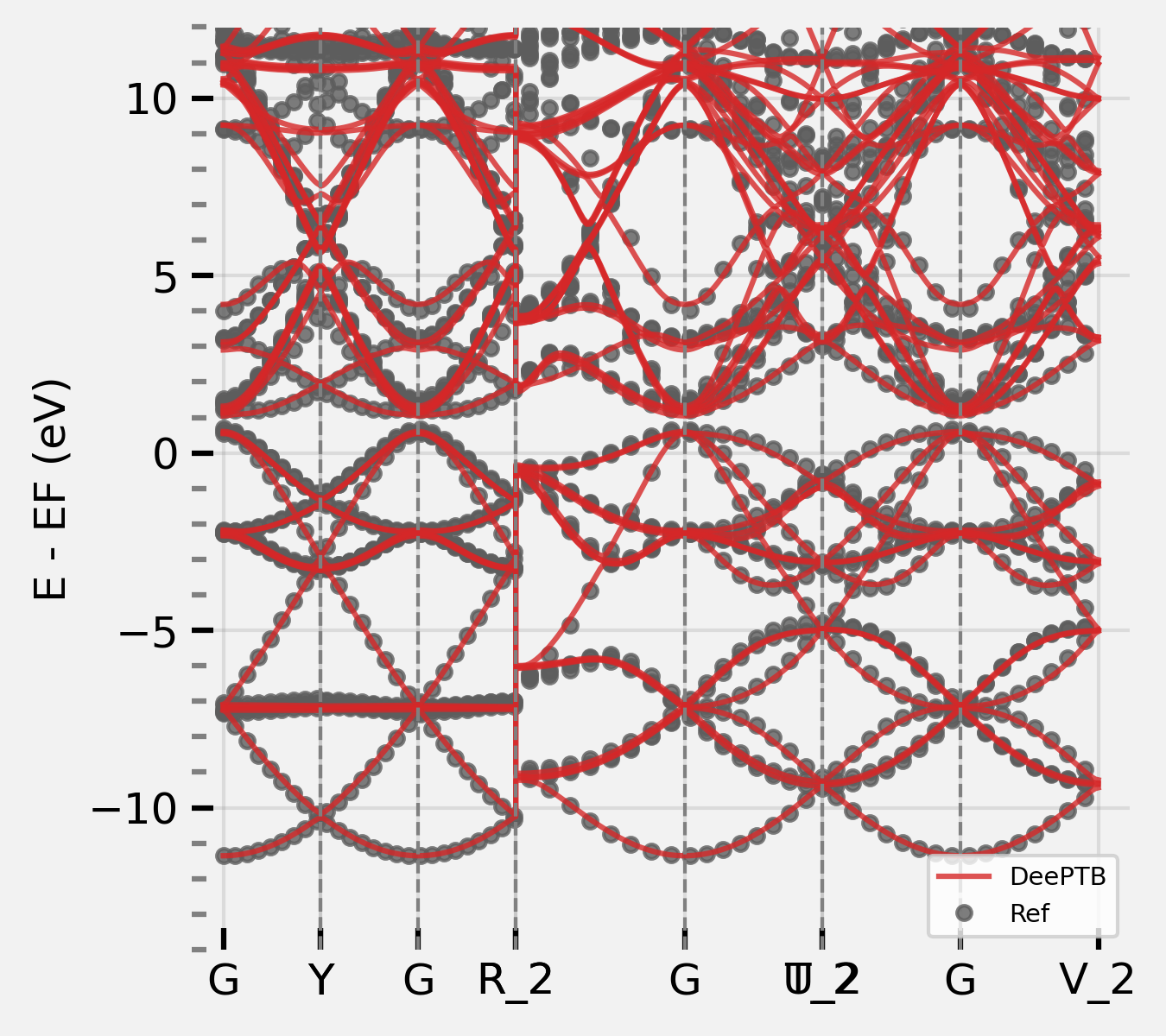 We highly suggest training the model from a low temperature, and the transfer to a higher temperature to improve the fitting stability.
### 3. Training Deep Learning TB Models with Env. Correction
**DeePTB** provides powerful environmental-dependent modelling with symmetry-preserving neural networks. Based on the last step, we can further enhance the power of TB model to overcome the accuracy limit, brought by the two-centre approximation. The environment correction is added by the embedding and prediction part of the model output:
$$
\begin{equation}
h^{\text{env}}_{ll^\prime{\zeta}} = h_{ll^\prime{\zeta}}(r_{ij}) \times \left[1+\Phi_{ll^\prime\zeta}^{o_i,o_j}\left(r_{ij},\mathcal{D}^{ij}\right)\right]
\end{equation}
$$
We denote the model that builds the environmental dependence as `dptb`. To define a `dptb` model in `model_options`, we need:
- `embedding`: defines the descriptor of environment.
- `prediction`: defines the size of the correction network.
- `nnsk`: just as the previous `nnsk` inputs. It is important to set keyword `freeze` to `true` when one initializes a new `dptb` model.
With the converged checkpoint in the last step, we can just run:
```bash
dptb train ./input/2-4_input.json -i ./nnsk_md25/checkpoint/nnsk.ep43.pth -o ./dptb
```
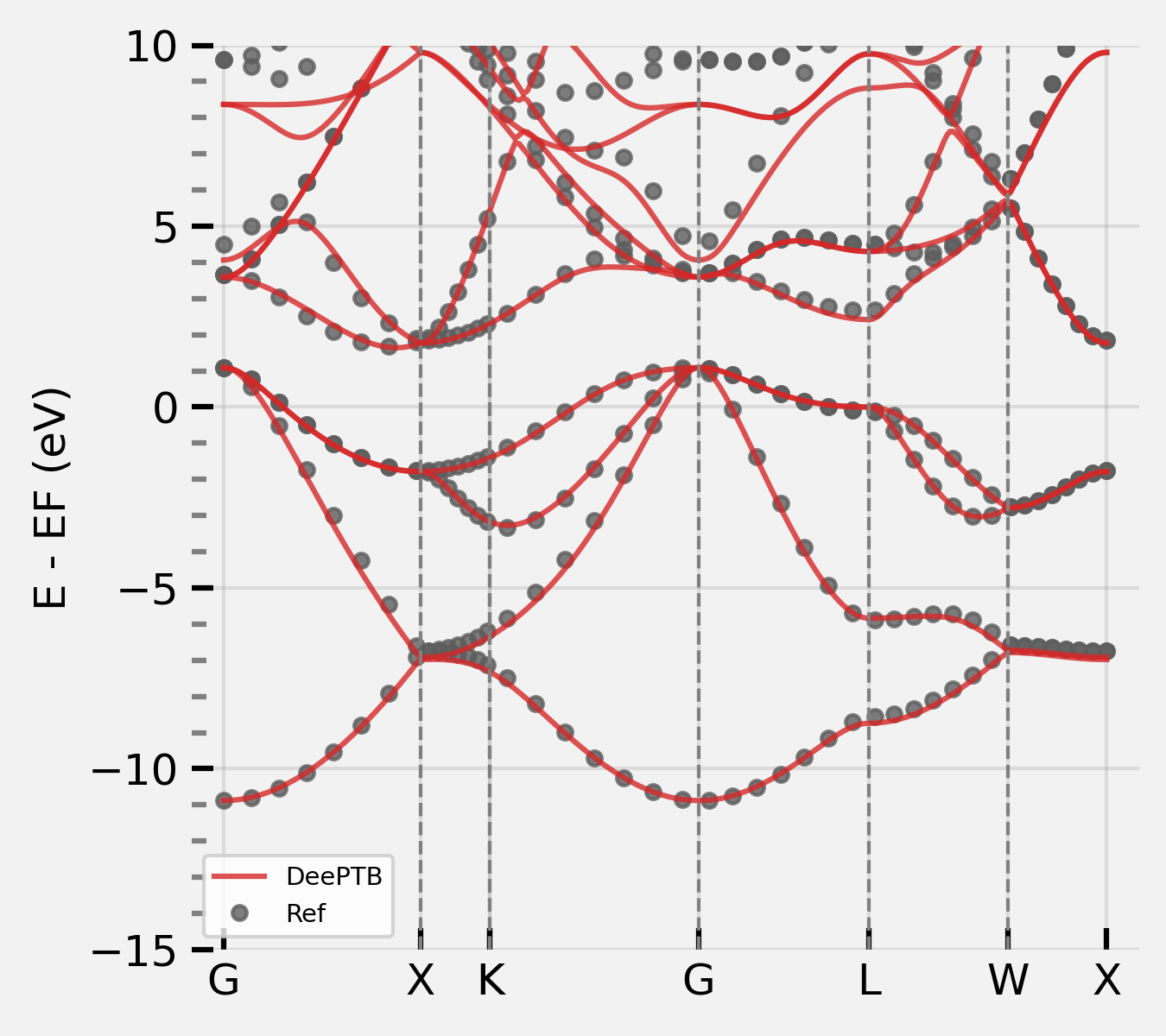
We can use the converged model to predict the bandstructure, calculating properties supported by **DeePTB**, or get the predicted Hamiltonian directly.
We highly suggest training the model from a low temperature, and the transfer to a higher temperature to improve the fitting stability.
### 3. Training Deep Learning TB Models with Env. Correction
**DeePTB** provides powerful environmental-dependent modelling with symmetry-preserving neural networks. Based on the last step, we can further enhance the power of TB model to overcome the accuracy limit, brought by the two-centre approximation. The environment correction is added by the embedding and prediction part of the model output:
$$
\begin{equation}
h^{\text{env}}_{ll^\prime{\zeta}} = h_{ll^\prime{\zeta}}(r_{ij}) \times \left[1+\Phi_{ll^\prime\zeta}^{o_i,o_j}\left(r_{ij},\mathcal{D}^{ij}\right)\right]
\end{equation}
$$
We denote the model that builds the environmental dependence as `dptb`. To define a `dptb` model in `model_options`, we need:
- `embedding`: defines the descriptor of environment.
- `prediction`: defines the size of the correction network.
- `nnsk`: just as the previous `nnsk` inputs. It is important to set keyword `freeze` to `true` when one initializes a new `dptb` model.
With the converged checkpoint in the last step, we can just run:
```bash
dptb train ./input/2-4_input.json -i ./nnsk_md25/checkpoint/nnsk.ep43.pth -o ./dptb
```
We can use the converged model to predict the bandstructure, calculating properties supported by **DeePTB**, or get the predicted Hamiltonian directly.
 Now you know how to train a **DeePTB** model, congratulations!